
🛰️ TL;DR - Got tired of posting on Bluesky with no clue if anyone cared, so I built Skyflow to figure out what actually works. It tells you which posts break through the noise, who's driving real conversations in your network, and when your audience is actually paying attention (in the hope of translating the social media guessing game into something you can actually understand and improve).
I built Skyflow to answer a question that kept nagging at me: what's really happening in my Bluesky network? Beyond follower counts and likes, I wanted to understand the genuine patterns of engagement and influence. What started as a technical challenge evolved into a crash course in product development - from user psychology to growth strategy. As I navigate this complete unknown, I'm learning that building a successful product demands more than clean code. It's about crafting compelling narratives, designing intuitive interfaces, and understanding what makes users click. Here's a behind-the-scenes look at both the technical architecture and the marketing lessons that are shaping Skyflow's evolution.
Concept
I've spent far too long staring at Bluesky wondering if anyone actually cares about what I'm posting. Crafting what I thought were brilliant posts, hitting send, and then... crickets. Or worse, watching someone else's content blow up with no idea why. After months of this guessing game, I got tired of flying blind and decided to build something about it. Skyflow started as my own attempt to figure out when my audience was actually online, what topics were resonating in my network, and whether I was growing or just shouting into the void. Turns out, having real metrics and scores that tell you how you're actually doing makes all the difference between posting with purpose and just hoping for the best. After a few months of experimental building, Skyflow helps you:
- Track which posts are actually breaking through.
- See who's consistently driving conversations.
- Visualise your network's engagement patterns.
- Monitor your own growth metrics.
 Skyflow is built on the AT Protocol, turning Bluesky's open framework into a powerful analytics playground.
Built with FastAPI, Skyflow's server connects to the AT Protocol through the Python SDK. It authenticates using XRPC, fetches timeline data through protocol-specific queries, and processes the network data using the SDK's built-in utilities for handling Bluesky's data structures. These raw insights are then transformed into meaningful analytics about your network.
Curious about how this all works? Learn more about the mighty federation architecture and discover how social media could be reinvented.
Skyflow is built on the AT Protocol, turning Bluesky's open framework into a powerful analytics playground.
Built with FastAPI, Skyflow's server connects to the AT Protocol through the Python SDK. It authenticates using XRPC, fetches timeline data through protocol-specific queries, and processes the network data using the SDK's built-in utilities for handling Bluesky's data structures. These raw insights are then transformed into meaningful analytics about your network.
Curious about how this all works? Learn more about the mighty federation architecture and discover how social media could be reinvented.
Requirements
Building a social analytics platform isn't just about counting likes and replies. It's about creating a system that can:
- Handle authentication securely.
- Process large amounts of social data efficiently.
- Store and retrieve insights quickly.
- Present data in meaningful, modular ways.
And all of this needs to happen in near real-time.
While remaining scalable.

Architecture
The service pattern
One of the most important architectural decisions was implementing a clear service layer pattern. The choice of FastAPI wasn't just about speed (even though it's blazingly fast). It was about building a modern API that could handle asynchronous operations elegantly. Ever wondered how a great pizzeria runs smoothly? It's not just about throwing ingredients together—it's about having each team member know exactly what they're doing. Our API architecture is pretty much the same deal. Picture FastAPI as our state-of-the-art kitchen. It's not just fast—it's smart, efficient, and can handle a rush of orders without breaking a sweat:
import asyncio
from fastapi import Request, Body, Depends

# Service
class PizzaService:
    """The world's fastest pizza preparation service"""
    @staticmethod
    async def prepare_pizza(pizza_type: str) -> dict:
        """Preparing your pizza at light speed"""
        await asyncio.sleep(20) # Our 'magic' 20-second pizza
        return {
            "pizza": pizza_type,
            "status": "Prepared",
            "message": "Buon appetito 🤌"
        }

# Factory
def new_pizza_service() -> PizzaService:
    """Summoning a lightning-fast pizza wizard"""
    return PizzaService()

# Endpoint
@app.post("/pizzaexpress")
async def pizza_endpoint(
    pizza_type: str = Body(...),
    service: PizzaService = Depends(new_pizza_service)
) -> JSONResponse:
    """Where pizza dreams meet impossible timelines"""
    pizza_result = await service.prepare_pizza(pizza_type)
    return JSONResponse(content=pizza_result)
From the moment a pizza is requested to the perfectly crafted response that flies back, our API moves like a well-oiled Italian kitchen: every request is a hungry customer, every service is a chef, and every response is a piping hot pizza of pure data deliciousness.

For those new to backend development, here is an overview of the various layers of logic that our "pizzeria" needs to consider:
Ingredients warehouse (the repository layer)
This is where we handle all interactions with the database. Each repository interacts with one or more database collections, and contains methods for performing CRUD (Create, Read, Update, Delete) operations. By abstracting database logic into repositories, we can easily change or update our database interactions without affecting the service or business logic. In the context of a Pizzeria, imagine a perfectly organised storage room where every ingredient is tracked, fresh, and ready to go. This team will be responsible for:
- Managing all our raw ingredients (data).
- Keeping everything sorted and organised.
- Ensuring we can grab exactly what we need, when we need it.
Head chefs (the service layer)
The service layer is where the business logic of the application lives. A service typically interacts with one or more repositories to perform operations and implement application workflows. The service layer does not directly access the database; instead, it calls the appropriate methods in the repository layer. This ensures the service layer focuses on higher-level application logic, such as validation, data transformation, and coordination between multiple repositories. In the context of a Pizzeria, the services are our culinary masterminds. They don't just grab ingredients—they transform them. A raw tomato becomes a perfect sauce. Plain dough becomes a crispy crust. Pineapple gets redirected to the bin (not sorry). In the world of 0s and 1s, this is where raw data becomes meaningful information. This team will be responsible for:
- Creating recipes (business logic).
- Combining ingredients in unique ways.
- Ensuring everything tastes amazing.
- Avoiding preparation of ingredients (that's the warehouse team's job).
Waitstaff (the router layer)
This is where the application endpoints are defined. Each route handles incoming HTTP requests and forwards them to the appropriate service layer. The service layer processes the request and interacts with the repository as needed, and the result is returned to the client. By keeping the endpoints simple and delegating logic to the service layer, we maintain a clear separation of responsibilities. This team will be responsible for:
- Taking your order (incoming request).
- Communicating it perfectly to the kitchen.
- Bringing back exactly what you asked for.
- Ensuring everything looks and tastes just right before it reaches you.
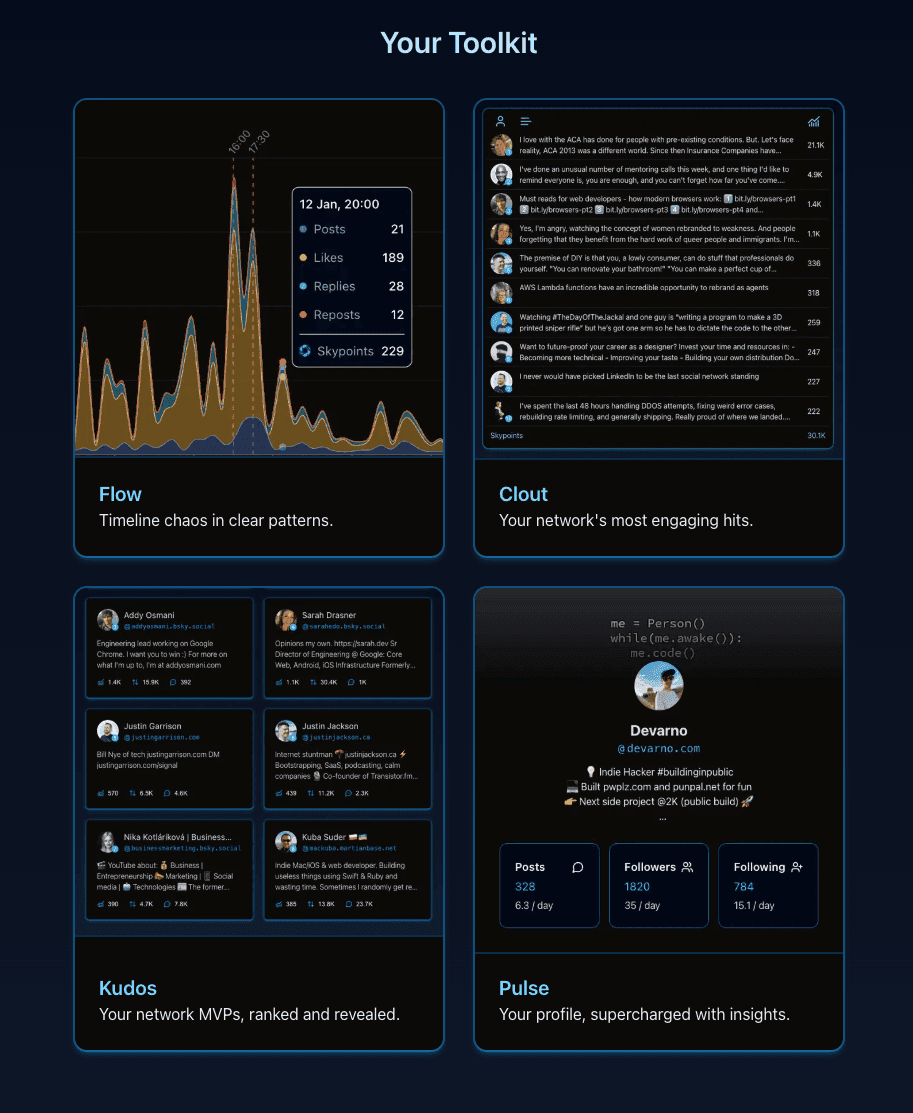
For Skyflow, each feature (
Flow,Clout,KudosandPulse) is like a different section of our menu. Different dishes, same amazing kitchen system. This separation of concerns makes the code far more maintainable and easily testable (ready to scale faster than Domino's on a Friday night).
The secret sauce
I think the evidence speaks for itself here. A developer can excel beyond their expectations by simply learning to treat their code like a craft, and not just a task. Every line is an ingredient, every function a carefully balanced recipe. Beyond the comedy, this simplified example showcases our architectural principles:
- The repository layer represents our ingredients inventory.
- The service layer transforms a simple request into a magical pizza.
- The router ensures your impossible pizza dream becomes a reality. Would a real pizzeria work like this? Of course not. But in the world of software architecture, we're all about pushing boundaries—sometimes with a healthy dose of humor.
Timeline processing
One of the first major challenges was efficiently processing timeline data. The BlueskyService implements a thoughtful approach to this:
- Uses cursor-based pagination with a sensible limit (50 posts per request).
- Implements empty response detection (stops after 5 empty results) to avoid unnecessary API calls.
- Filters posts by a calculated cutoff time (midnight of the previous day).
- Maintains a set of seen post IDs to prevent duplicates.
- Caps the maximum search depth at 2000 posts to balance thoroughness with performance. Remember, every great project starts with a simple problem and grows through iteration and learning. Keep building, keep learning, and most importantly, keep sharing what you learn with others.
Engagement analysis
While both Clout and Kudos dive deep into Bluesky's social fabric, they illuminate different aspects of network influence.
Clout focuses on viral moments - the individual posts that break through the noise. It's a snapshot of content that sparks conversation, identifying the top 10 most engaging posts while preventing any single creator from dominating the results.
Kudos zooms out to measure sustained impact. It aggregates engagement across likes, replies, and reposts to highlight the top 8 users consistently driving meaningful interactions. This feature goes beyond momentary virality to reveal who's truly moving the network's conversation.
Think of Clout as catching lightning, Kudos as tracking the storm's entire electrical pattern - now within your core network. Or in flow terms, Clout catches the viral waves, Kudos reveals who consistently creates them.
 The mutual network filter emerged from a suggestion from one of Skyflow's early adopters - a marketer with 15+ years experience who suggested focusing on accounts that follow you back. This transformed our analytics from broad network trends to your most engaged circle creating "an entirely different ballgame for building a hype squad" (cred: @daniloebs)
The result? Insights that matter, from the connections that truly count.
The mutual network filter emerged from a suggestion from one of Skyflow's early adopters - a marketer with 15+ years experience who suggested focusing on accounts that follow you back. This transformed our analytics from broad network trends to your most engaged circle creating "an entirely different ballgame for building a hype squad" (cred: @daniloebs)
The result? Insights that matter, from the connections that truly count.
Backend flow
When you use Skyflow, your data goes through a carefully designed journey. Think of it like a social media assembly line, but for understanding your Bluesky presence.
First, when you hit the 'Connect' button, Skyflow connects to Bluesky and collects four key things: your profile details, the list of people you follow, the list of people following you, and your recent timeline. Once it has this raw data, it begins processing it through different specialised services - imagine these as different experts each looking at your data through a unique lens. The Flow service looks at engagement trends across the given timeframe, the Clout service identifies the most impactful content, and the Kudos service finds your most engaged connections.
All of this information then feeds into the Pulse service, which combines everything to give you a complete picture of your Bluesky presence. Finally, all these insights are stored in a database (so we can track changes over time) and sent back to your screen in an organized, easy-to-understand format.
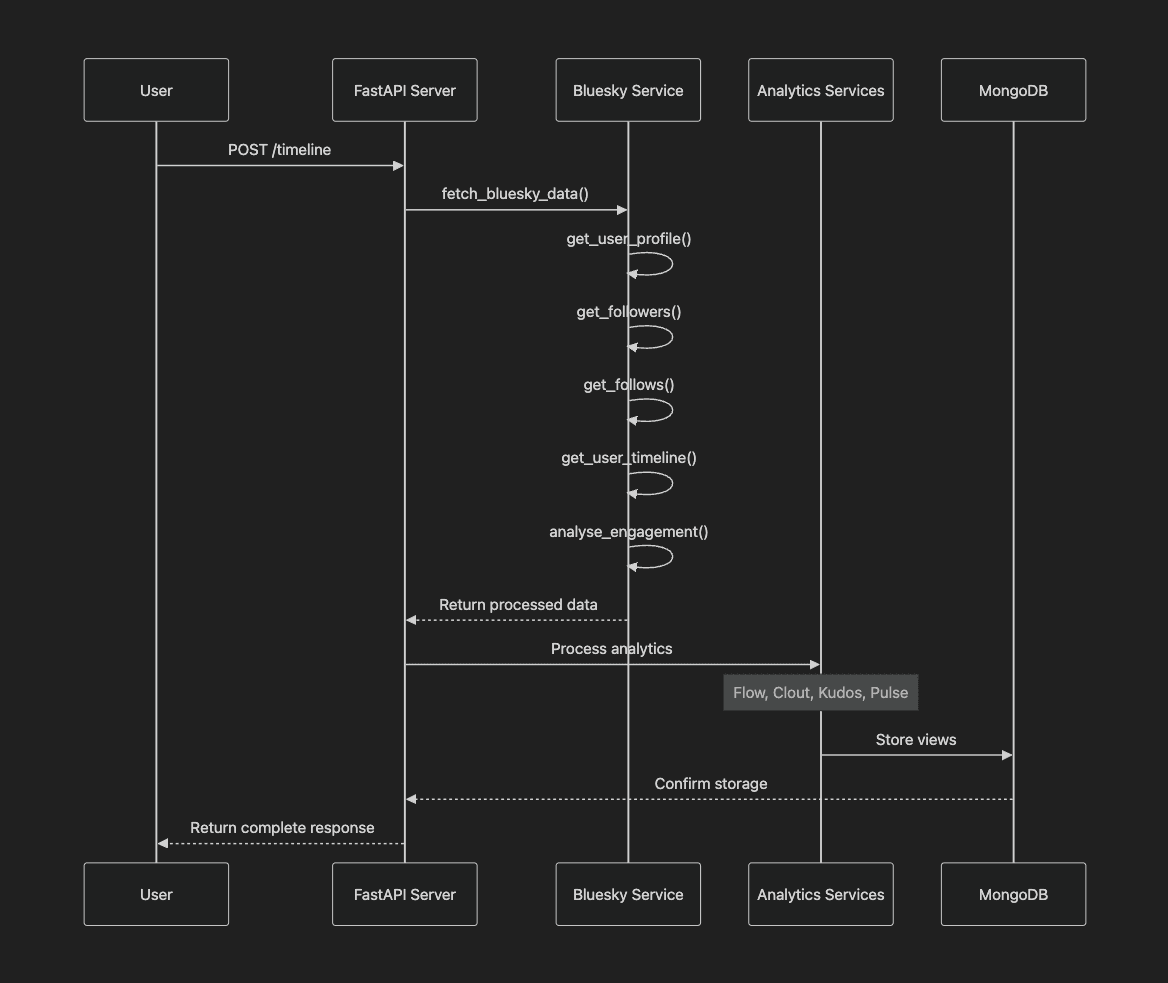 The whole process usually takes 10 - 20 seconds, but behind the scenes, it's processing thousands of data points to give you meaningful insights about your Bluesky timeline activity. It's similar to how a professional analyst might study your social media presence, but automated and happening in real-time.
Time windows
When working with time-series data, it's often necessary to group events that occur within specific time intervals. At the heart of the BlueskyService class is a sophisticated time-bucketing system that transforms raw data into meaningful patterns, by taking a list of timestamped dictionaries and grouping them based on a predefined timeframe.
Imagine we have a dataset containing log entries with timestamps in ISO format:
data = [
    {"id": 1, "event": "login", "date": "2024-02-06T14:03:15"},
    {"id": 2, "event": "view_page", "date": "2024-02-06T14:07:42"},
    {"id": 3, "event": "purchase", "date": "2024-02-06T14:18:33"},
    {"id": 4, "event": "logout", "date": "2024-02-06T14:59:50"},
    {"id": 5, "event": "login", "date": "2024-02-06T15:02:10"},
]
For this example, let's assume that we want the events to be grouped into 10-minute intervals. For this we need to:
- Convert each ISO date string into a datetime object.
- Truncate the timestamp to the nearest 10-minute interval.
- Store events under their corresponding time slot.
def group_by_date(posts: list, timeframe: int = 10) -> dict:
    """Groups a list of dictionaries by 'date' into specified timing intervals"""

    grouped_posts = {}

    for post in posts:

        # Convert to datetime object
        date_obj = datetime.fromisoformat(post["date"])

        # Truncate timestamp to nearest interval
        delta = timedelta(minutes=date_obj.minute % timeframe)
        group_key = date_obj - delta

        # Edge Case: Handle unwanted midnight shifts
        if group_key.hour == 0 and date_obj.hour > 0:
            group_key -= timedelta(days=1) # Move back 1 day

        # Format timestamp as processable key
        group_key = group_key.strftime("%Y-%m-%d %H:%M")

        # Add post to corresponding group
        grouped_posts.setdefault(group_key, []).append(post)

    return grouped_posts
This way, instead of drowning in minute-by-minute noise of a cluttered timeline, we can group our data into clean 10-minute intervals:
{
    "2024-02-06 14:00": [
        {"id": 1, "event": "login", "date": "2024-02-06T14:03:15"},
        {"id": 2, "event": "view_page", "date": "2024-02-06T14:07:42"}
    ],
    "2024-02-06 14:10": [
        {"id": 3, "event": "purchase", "date": "2024-02-06T14:18:33"}
    ],
    "2024-02-06 14:50": [
        {"id": 4, "event": "logout", "date": "2024-02-06T14:59:50"}
    ],
    "2024-02-06 15:00": [
        {"id": 5, "event": "login", "date": "2024-02-06T15:02:10"}
    ]
}

This allows us to:
- Smooth out random fluctuations.
- Highlight genuine trend lines.
- Make engagement patterns instantly readable. Imagine your network's energy as a catchy disco song - instead of counting every single note, Skyflow is finding the rhythm that makes people want to dance.
What's next?
Impact scores
The next major feature will be the Pulse dashboard impact scores. These will:
- Track your presence across other users' dashboards.
- Calculate participation scores across the network.
- Provide visibility into your broader network influence.
Growth strategy
Already considering translating raw metrics into actionable growth strategies:
- Identifying high-performing content types.
- Suggesting optimal posting windows based on audience activity.
- Converting engagement patterns into content timing recommendations.
Storage and scalability
- Need to optimise the timeline processing for larger, customisable follower networks.
- Consider implementing caching for frequently accessed profile data.
- Design a more efficient engagement calculation system.
- May need to lean towards time-series optimisations over simple document-based structure. Also considering adding some basic documentation to help with onboarding. Not currently a priority, but the first solution that comes to mind is something like Docusaurus.
Building in public
One of the most rewarding aspects of Skyflow has been progressing it as a #buildinpublic project. The mutuals filter suggestion is a perfect example of how community feedback is shaping the tool. It's not just about building features – it's about building the right features that solve real problems for Bluesky users. Following a Reddit launch, another early adopter suggested adding the nice info tooltip now found within each feature section. If you're using Skyflow or interested in its development, I'd love to hear your thoughts on these features and what else you'd like to see. Building tools for creators means constantly evolving with their needs.